
We publish daily typing exercises, quizzes, study material, courses, notes, and previous year question papers
and share updates on our social media channels.
Follow these professional guidelines to utilize our advanced Punjabi Typing and Transliteration features effectively.
Our tool simplifies Punjabi Typing by utilizing a phonetic English-to-Gurmukhi engine. Simply type the word as it sounds in English (e.g., “Pavitar”), and upon pressing the Spacebar, the system will convert it into the correct Gurmukhi script (“ਪਵਿੱਤਰ”).
To ensure maximum accuracy in your Punjabi Typing Pad sessions, a real-time suggestion menu appears. You may select the desired variant using your mouse or by utilizing the numerical keys (1-5) for a faster workflow.
The editor supports the Raavi Font (Unicode), which is the standard requirement for official Punjab Government documentation. Also you can directly copy and paste this text in your E-mails, WhatsApp Messages, etc. You can adjust font sizes and formatting directly from the toolbar. You can also convert Unicode to Asees, Joy, GurbaniLipi or back to Unicode (Raavi Font)
Once your draft is finalized, you may utilize the export features to save your work as a text (Notepad File) or a Microsoft Word (.doc) file or a PDF. This ensures your Gurmukhi text remains intact across all professional platforms.
A direct Print Text Button is available to print the typed text.
There a virtual phonetic Keyboard is available; just press a key with mouse or touch and the text will be added to typing pad.
Note: This Punjabi Typing interface is designed to provide a high-efficiency environment for content creators, translators, and administrative professionals. By eliminating the need for complex keyboard layouts, we facilitate a more streamlined document preparation process in the Gurmukhi script.
In today’s fast-paced digital world, communicating in Punjabi has never been easier. Whether you’re crafting professional emails, creating engaging social media content, or staying connected with family, Punjabi typing is the key to unlocking seamless Gurmukhi script output. Forget the frustration of complex keyboard layouts or lengthy software installations. With modern english to punjabi typing tools, you simply type in English (Roman script) as you speak, and the text converts instantly to beautiful Punjabi (Gurmukhi) script.
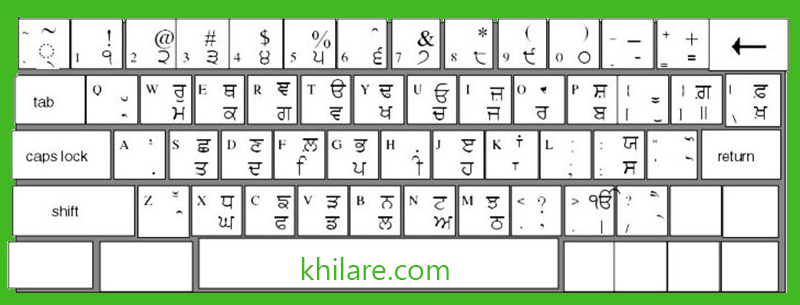
Here is the ultimate solution for effortless Punjabi typing – a powerful transliteration tool that transforms your regular English keyboard into a full-fledged Punjabi input system. Perfect for professionals, businesses, content creators, and the global Punjabi diaspora, this method delivers speed, accuracy, and productivity without any prior typing skills in Gurmukhi.
Punjabi typing refers to the process of generating text in the Gurmukhi script used for the Punjabi language. Traditionally, this required mastering a dedicated Punjabi keyboard layout or downloading specialized software. But today’s users demand more: instant results on any device, anywhere.
The breakthrough comes from english to punjabi typing technology – phonetic transliteration. You type words phonetically in English (for example, “Sat Sri Akal” becomes “ਸਤਿ ਸ੍ਰੀ ਅਕਾਲ” automatically), and the tool handles the conversion. It’s not a full translation of meaning; it’s a smart script converter that respects pronunciation while producing accurate Gurmukhi output.
Popular variations include roman to punjabi typing, type punjabi in english keyboard, and even google punjabi typing integrations. Whether you’re searching for punjabi keyboard online, punjabi typing software, or a punjabi typing app, the core principle remains: type English, get Punjabi – instantly.
At its heart, english to punjabi typing relies on advanced phonetic mapping. Here’s the straightforward process:
This differs from traditional punjabi typing keyboard layout methods, which demand memorizing keys like InScript or Remington. Instead, roman to punjabi typing lets you leverage your existing English keyboard skills. Many tools also support punjabi voice typing for hands-free input, where you speak and the system transcribes directly.
For precise documents, users often pair it with raavi font typing. The Raavi font (a popular Gurmukhi typeface used in government exams and official printing) ensures perfect rendering. Tools provide punjabi typing chart raavi compatibility, so your output looks professional in tests or publications.
Switching to Transliteration engine delivers measurable advantages:
High-value use cases highlight its power:
| Aspect | Traditional Methods | Online English-to-Punjabi Typing |
|---|---|---|
| Learning Curve | High (weeks of practice) | None – type as you speak |
| Installation | Required (software/apps) | Browser-based, zero install |
| Speed | Slow until mastered | Instant, real-time |
| Compatibility | Device-specific | Any desktop/mobile/browser |
| Cost | Often paid | Completely free |
The best Punjabi typing tools are fully responsive and work on:
Punjabi typing has never been simpler. Whether you need english to punjabi typing, type punjabi in english keyboard, or full punjabi keyboard online access, modern tools remove every barrier.
Try the tool right now on this page and experience the speed and convenience yourself. Type English → Get perfect Punjabi instantly.
Ready to boost your productivity? Start typing Punjabi in English right now – no downloads, no learning curve, just results.
Last updated: This tool has been updated on 27 April, 2026