How to Type Punjabi on Windows and Mac Without Downloading Font
Key takeaways
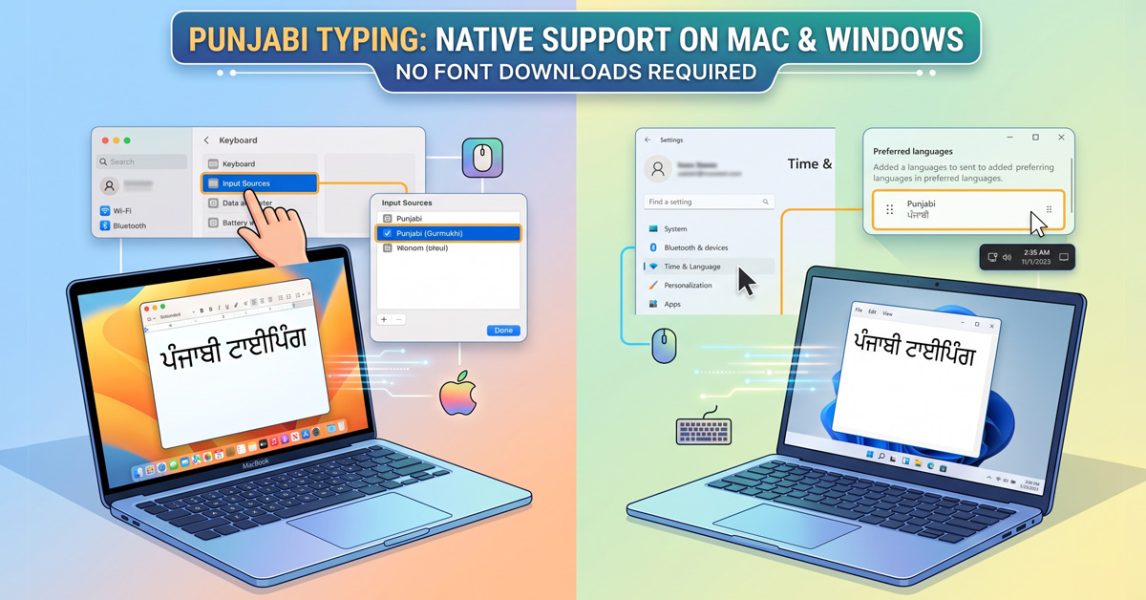
- Windows and Mac already include everything needed to type Punjabi in Unicode. The font-download habit is solving a problem that hasn’t existed for years.
- The font you choose changes the rules: phonetic input is fine for casual typing, but PSSSB and similar boards require Raavi Unicode in Inscript mode, graded at 30 WPM and 92 percent accuracy.
- A legacy ASCII font can make an entire site invisible to Google and unreadable to screen readers, even when the visible text on screen looks perfectly correct.
- Punjabi-speaking communities in Canada, the UK, and the US have grown fast enough over the past decade that diaspora-focused typing content is still catching up to demand, not ahead of it.
Open Windows or macOS right now and you already have what you need to type Punjabi. No Asees download, no zip file from a blog with fifteen pop-up ads, no font that looks fine on your laptop and turns into boxes on someone else’s phone.
If you are looking for Punjabi Typing Online Tool, then here it is.
Enable the Built-in Punjabi Keyboard (Windows & Mac)
Here are the exact, step-by-step instructions to enable the built-in Punjabi (Gurmukhi) Unicode keyboards across Windows and macOS.
Windows 11
-
Open Settings (press
Windows key + I). -
On the left sidebar, click on Time & language.
-
Select Language & region.
-
Next to “Preferred languages,” click the Add a language button.
-
Search for Punjabi, select Punjabi (Gurmukhi), and click Next.
-
Click Install.
-
To type: Press
Windows key + Spacebarto toggle between English and Punjabi.
Windows 10
-
Open Settings (press
Windows key + I). -
Click on Time & Language
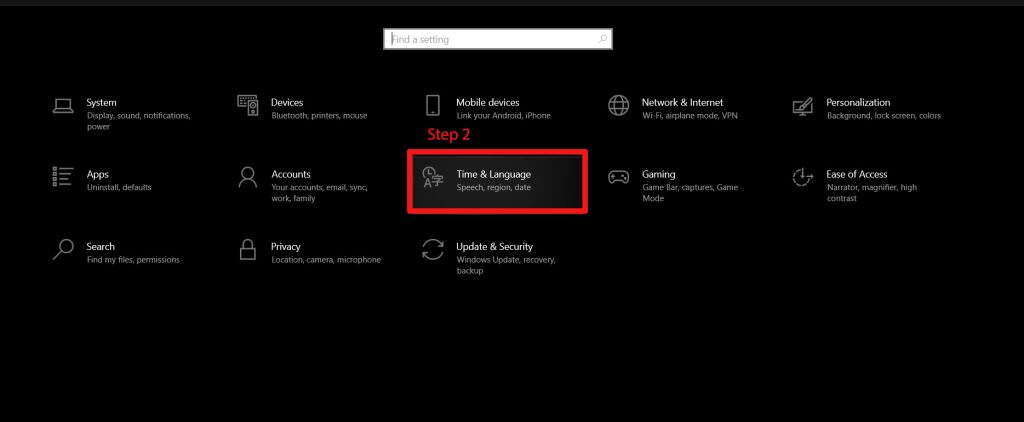
Windows 10 Punjabi Unicode Language Add Step 2 -
Then select Language from the left sidebar.
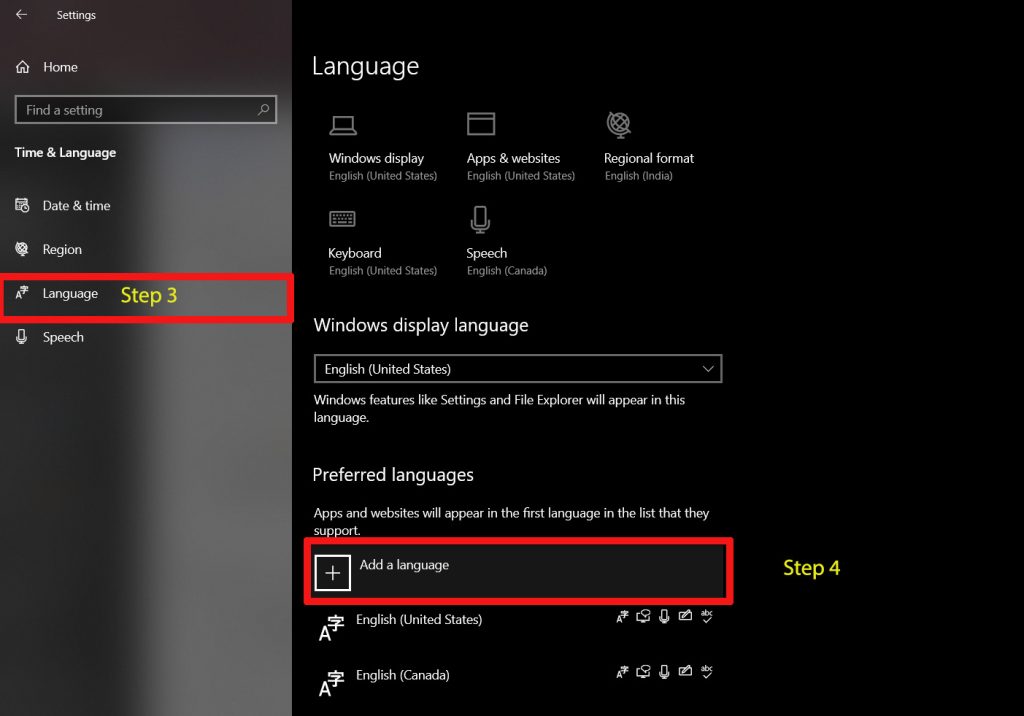
Windows 10 Punjabi Unicode Language Add Step 3 and 4 -
Under the “Preferred languages” section, click Add a language.
-
Search for Punjabi, select Punjabi (Gurmukhi), and click Next.
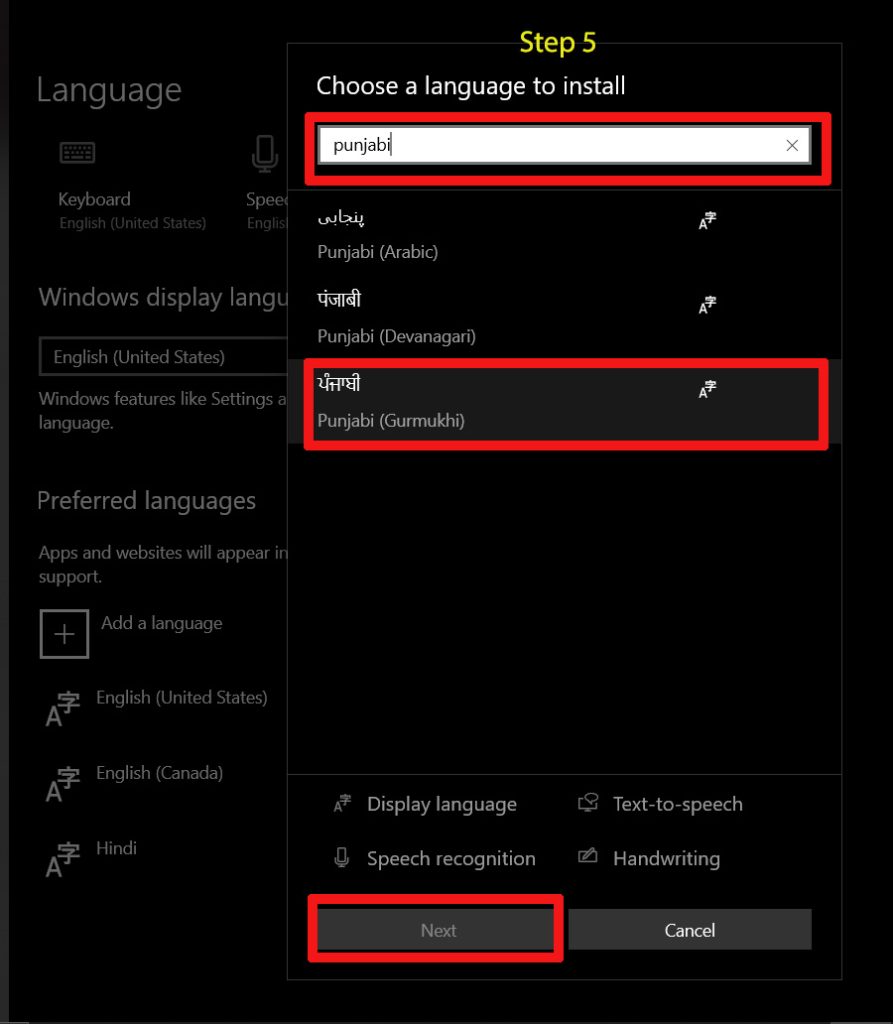
Windows 10 Punjabi Unicode Language Add Step 5 -
Click Install.
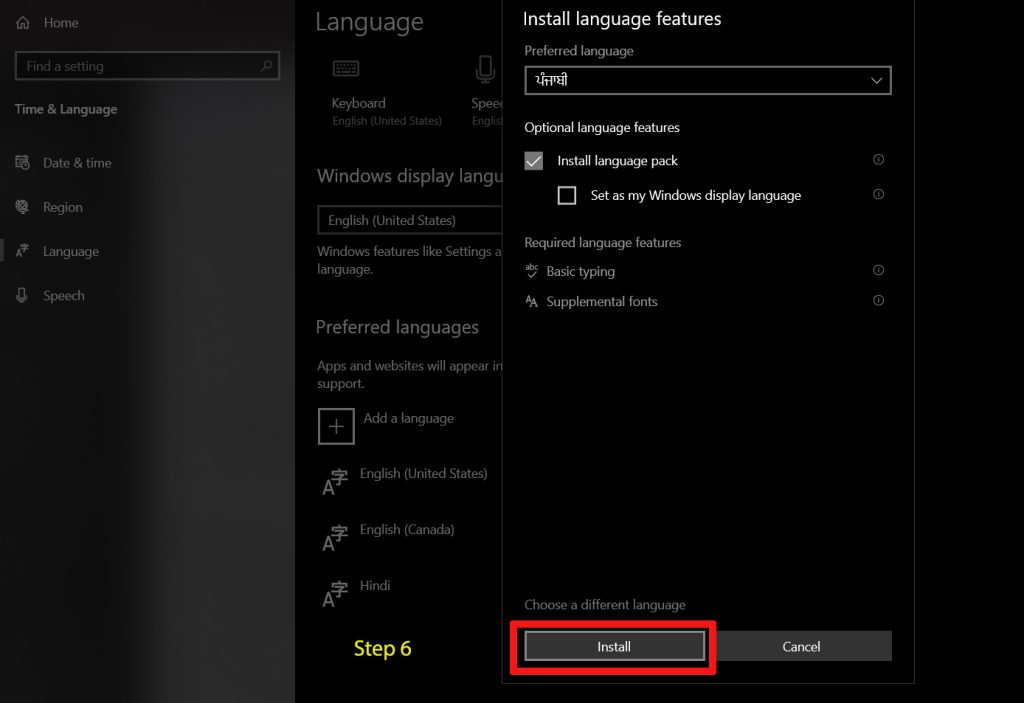
Windows 10 Punjabi Unicode Language Add Step 6 -
To type: Press
Windows key + Spacebarto toggle your keyboard.
Windows 8 / 8.1
-
Open the Control Panel.
-
Click on Clock, Language, and Region, then click on Language.
-
Click on Add a language.
-
Scroll through the list (or use the search box in the top right) to find Punjabi.
-
Select it and click the Add button at the bottom.
-
To type: Press
Windows key + SpacebarorAlt + Shiftto switch between languages.
macOS (Ventura, Sonoma, and newer)
-
Open System Settings (from the Apple menu ).
-
Scroll down the left sidebar and click on Keyboard.
-
Under the “Text Input” section, click the Edit… button next to “Input Sources.”
-
Click the + (plus) button in the bottom left corner.
-
Search for Punjabi in the sidebar.
-
Select your preferred layout (macOS offers standard Gurmukhi or Gurmukhi – QWERTY if you prefer to type phonetically using English keys).
-
Click Add, then Done.
-
To type: Press
Control + Spacebaror the Globe (Fn) key on newer Mac keyboards to switch.
A quick tip on layouts: When you enable Punjabi on Windows, it usually defaults to the InScript layout (the Indian government standard). If you are used to typing phonetically (where typing “k” gives you “ਕ”), you can click on the Punjabi language in your Windows settings, go to Language options, and add the Punjabi Phonetic keyboard. macOS has the QWERTY/Phonetic option right at the setup screen.
Both operating systems ( Windows or macOS ) carry full Gurmukhi support inside Unicode, the encoding standard that lets every device on earth agree on what a letter actually is. The download habit is a leftover from the era when typing Punjabi meant tricking an English keyboard into showing the wrong characters and hoping nobody else ever had to read the file.
Here’s where that support actually lives, how to switch it on for Windows and Mac, why an old downloaded font can quietly wreck a website, and what changes the moment a government exam gets involved.
Does Windows already have what you need?
Yes, and it has for a while. Open Settings, then Time & Language, then Language, and add Punjabi as a preferred language. Windows pulls the keyboard layout down in the background. No font, no plugin, no restart.
Two layouts show up once it’s installed. Inscript arranges Gurmukhi characters by linguistic frequency rather than by where the matching English letter sits, which is exactly why it feels foreign for the first few days. The other option is phonetic: type “Punjab” on an ordinary QWERTY layout and watch it turn into ਪੰਜਾਬ as you go.
Microsoft built that phonetic layout on the ISO 15919 transliteration standard and announced it to Windows Insiders in December 2018, then folded it into the general Windows 10 release the following year. At the time, Microsoft said it expected the change to cut Indic-language typing time by at least 20 percent, just by removing the need for a separate download.
I’d point casual users toward phonetic without hesitating. It matches how people already think in their head. Inscript is the one you need if a government exam is anywhere in your future, and we’ll get to why that distinction matters in a minute.
What about Mac, do you need to buy an Indic font?
No. Apple buries the setting one layer deeper than Windows does, but it’s already there. Go to System Settings, then Keyboard, then Text Input, click Edit, and add Punjabi or Gurmukhi as an input source.
Apple’s own list of fonts bundled with current macOS releases includes Gurmukhi MN, Gurmukhi MT, and Gurmukhi Sangam MN. All three ship by default. All three render identically whether you’re on a five-year-old MacBook or one bought last week.
What’s newer: recent versions of macOS also offer a transliteration option for Punjabi, the same idea as Windows’ phonetic layout, where you type in Latin letters and pick the correct Gurmukhi result from a small popup. Apple’s own guide to writing in another language on Mac covers the setup steps; most older tutorials online still only mention the traditional layout, probably because the transliteration option only showed up more recently.
One thing that trips people up on iPhone specifically: a font downloaded from outside the App Store often shows up as blank boxes, because iOS doesn’t recognize whatever encoding table it’s built on. Stick to the built-in input sources and the problem disappears.
Why your old Punjabi font probably broke something
Fonts like Asees work by lying to the computer. You press a key, the machine stores it as a plain English letter, and the font just paints a Gurmukhi character over the top for display. Copy that text into a search box, a different app, or a friend’s laptop without the same font installed, and you get a string of random Latin letters where Punjabi used to be.
I once watched this quietly kill the search visibility of a Government portal. Years of content sat online, technically published, completely unreadable to Google, because every page had been built on a legacy font instead of Unicode. The fix wasn’t a content problem at all. It was a font problem wearing a content problem’s clothes.
Screen readers hit the same wall from a different angle. Text-to-speech software reads what the file actually stores, and an ASCII-hack file stores English. A visitor relying on it gets gibberish read aloud where Punjabi should be.
One number behind every Gurmukhi letter
Unicode gives every Gurmukhi character a fixed numeric address that never changes across devices, fonts, or apps. ਕ, usually the first consonant anyone learns, sits permanently at U+0A15 in the Gurmukhi block, which runs from U+0A00 to U+0A7F.
That fixed address is the whole reason search engines, screen readers, and translation tools can agree on what they’re looking at. Google’s own crawling guidance is direct about pages needing UTF-8 encoding, the format that actually carries Unicode values intact instead of scrambling them into something else.
A page typed in a real Unicode font and a page typed in Asees can look identical on screen. To a crawler, they’re two different languages.
Typing on a phone is a different fight
Desktop typing and phone typing aren’t the same engineering problem, and most homemade transliteration tools find that out the hard way. Phones fire touch events instead of physical key presses. The spacebar, specifically, tends to misbehave.
I once debugged a transliteration pad where tapping space on a phone just sat there, refusing to convert the Latin word into Gurmukhi, while the exact same code worked fine on a laptop. The fix meant listening for both the input and keyup events instead of trusting either one alone, because Safari on iOS and Chrome on Android don’t always fire them in the same order.
Skip that detail and roughly half of a typing tool’s audience gets a broken product, since mobile traffic carries most Punjabi-language search in places where desktop ownership is lower.
Browser pad or system keyboard, which one actually wins?
For a quick caption or a one-line message, a browser-based typing pad wins on convenience. Open the page, type, copy, done. No settings menu, no keyboard switch.
For real volume, the system keyboard wins. A typist who has actually built Inscript muscle memory can clear fifty words a minute without looking down, something a phonetic guess-and-correct tool can’t match once you’re past the casual stage.
The honest tradeoff: phonetic engines guess wrong occasionally, and fixing a wrong guess mid-sentence eats more time than just typing the right character would have cost in the first place.
Government exams want something else entirely
Recruitment boards in Punjab don’t accept phonetic typing, and they’re specific about why. The Punjab Subordinate Services Selection Board’s own typing-test instructions require candidates to type the Punjabi passage in Unicode-compliant Raavi font using the Inscript keyboard. No transliteration shortcut allowed.
The same document sets the bar at a minimum gross speed of 30 words per minute in both Punjabi and English, with no more than 8 percent errors, which puts the real accuracy floor at 92 percent. Vowels, half-characters, and conjuncts each count as their own character when the software grades the attempt, so one missed matra turns a correct word into a wrong one.
Raavi specifically became the standard for a practical reason rather than a stylistic one: it ships natively with Windows, so a candidate’s answer renders the same way on every exam center’s machine, with no font-installation step that could fail on exam day.
Who’s actually searching for this?
Punjabi has quietly become one of the fastest-growing languages in three countries that have nothing to do with Punjab. In Canada’s 2021 census, more than 520,000 people reported speaking Punjabi predominantly at home, up 49 percent from 2016. Outside English and French, only Mandarin is spoken by more people in the country.
In England and Wales, the 2021 census recorded 291,000 Panjabi main-language speakers, the third most common language after English and Polish, just ahead of Urdu.
In the United States, the Census Bureau didn’t even track Punjabi as its own category until 2016; before that, it sat folded into a generic “other Indic languages” bucket. That detail alone says something about how recently this audience grew large enough to count separately, and why diaspora-focused typing content still lags far behind exam-prep content built for Punjab itself.
Why Punjabi content is sitting on an easy SEO opening
English search results are packed. Punjabi results for the same underlying questions mostly aren’t, simply because so few sites publish in the script itself instead of just writing about it in English.
The technical setup matters as much as the writing. Google’s guidance on multilingual sites is clear that each language version needs its own URL with an hreflang tag pointing to it, rather than swapping content based on browser settings or IP address. Google explicitly says it doesn’t trust IP-based targeting at all.
Get that structure right, on a page actually served in clean UTF-8, and a Punjabi page ends up competing against a noticeably thinner field than its English equivalent on the same topic.

Dev Singh
Dev is a dedicated Educationalist, social worker and free educator who has made significant contributions to uplifting underprivileged communities through education and grassroots empowerment. Known for a hands-on, community-centric approach, he blends social service with educational initiatives to ensure marginalized children and individuals have access to learning, opportunity, and hope
View all posts by Dev Singh